



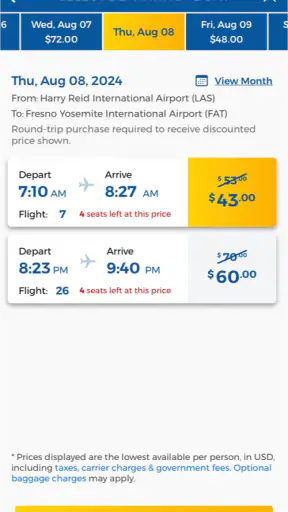
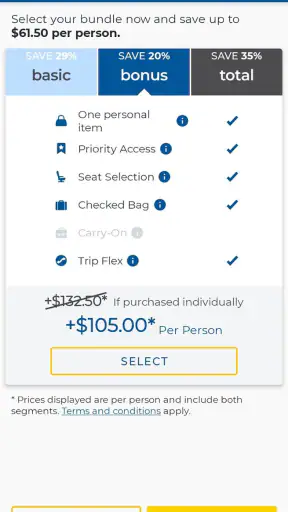
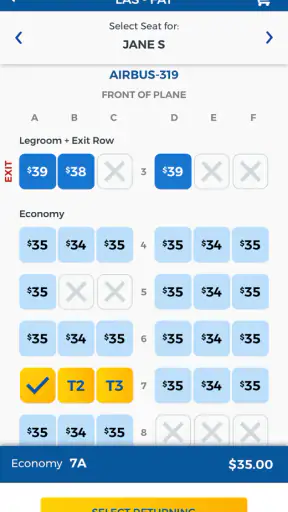
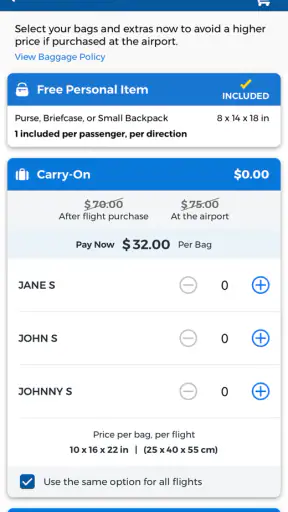

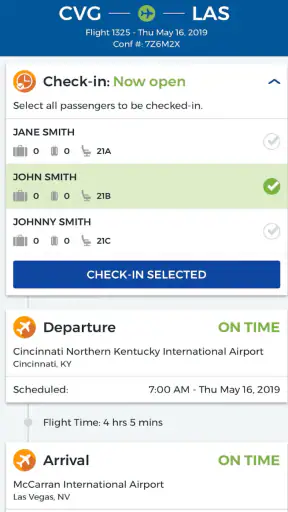
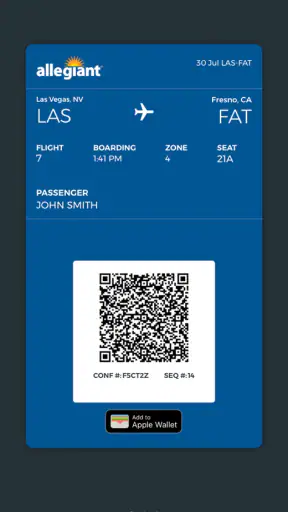
When I travel with Allegiant, I want the airline’s app to do one job well: reduce the number of times I need to search through emails, open a browser, or stand at an airport desk. Allegiant is the official travel app from Allegiant Travel Company, and I found it most useful as a focused companion for managing an Allegiant trip rather than as a general travel planner.
That distinction matters. This is not the app I would choose to compare every airline, build a multi-carrier itinerary, or organize an entire vacation across several booking services. Its value comes from keeping Allegiant-related travel tasks in one place. For passengers already flying with the airline, that narrow purpose can be a real advantage. For anyone who rarely uses Allegiant or wants broad travel search, the limits become more noticeable.
It is free, rated for Everyone, and available for Android devices running version 6.0 or later. The current release is 7.10.1. With more than five million installs and an average rating of 3.3 from roughly eighteen thousand ratings, it is clearly used by a substantial number of travelers, although the rating also suggests that the experience is not equally smooth for everyone.
How Allegiant feels during normal travel tasks
My first impression is that the app is built around practical travel moments rather than leisurely browsing. I expect to open it when I need to check a reservation, review a flight-related detail, or handle something close to departure. That makes the perceived speed especially important: an airline app does not need to entertain me, but it should get out of my way when I am already carrying luggage or trying to make a decision quickly.
In ordinary use, the focused design works in its favor. There are fewer distractions than in a broad travel marketplace, and I am not forced to move through unrelated hotel, rental-car, or destination content before reaching the airline task I came to complete. The trade-off is that the app’s usefulness depends heavily on having an Allegiant booking or a clear reason to interact with Allegiant services.
I would not judge its speed only by how quickly the first screen appears. Travel apps often have to retrieve current booking information, and those moments can feel slower than opening a static page. My practical advice is to open the app before leaving for the airport, while you still have time and a dependable connection. That simple habit gives the app a chance to load the information you may need before the stressful part of the journey begins.
The best performance expectation is “focused and useful,” not “instant in every situation.” If you treat it as a last-second rescue tool while walking through a crowded terminal, your experience may depend as much on connectivity and the phone itself as on the app.
What it is like when the trip becomes complicated
The real test for an airline app is not a quiet evening at home. It is the heavy-use moment: a departure day, a changed plan, a family trying to coordinate, or a traveler repeatedly switching between booking information and other airport details. That is when small delays and unclear transitions become much more irritating.
Allegiant is most helpful when I use it for one defined task at a time. I would open it to confirm the trip, inspect the relevant travel information, then close it rather than leaving it running while I juggle maps, messages, and entertainment. This is not only easier on attention; it also reduces the chance that I will assume a screen is still current after spending several minutes in another app.
For a family trip, I would prepare in stages. First, I would review the reservation at home. Next, I would make sure each traveler knows where the important information is. Finally, I would reopen the app before heading to the airport. That workflow is more dependable than expecting one person to solve every detail from a phone in a queue.
One useful trade-off is that a dedicated airline app can feel clearer than a general travel app when the question concerns one carrier. A general service may be better for comparing options, but once I have chosen Allegiant, its own app is the more logical place to manage that airline-specific part of the trip. I would still keep confirmation details available through another channel, especially for a time-sensitive journey. That is not a criticism unique to this app; it is sensible preparation whenever travel information matters.
Resource demands are also worth considering. I would not expect an airline app to be as light as a simple notes or calendar application because it has to present changing trip information and account-related screens. On a newer phone, that difference may be unimportant. On an older device close to the minimum supported Android release, transitions may feel less comfortable, especially if many other apps are open. Closing unused apps before an airport session is a small but worthwhile precaution.
Stability, interruptions, and recovering without panic
Reliability is more than avoiding a crash. For me, a reliable travel app should let me return to the same task after a phone call, a weak connection, or an accidental swipe away. Allegiant’s role makes recovery particularly important because airport use is full of interruptions. I may have to answer a message, show identification, check a gate display, or hand the phone to another traveler.
I recommend reopening the relevant screen after any long interruption instead of assuming that what was visible earlier is still the latest state. This is a good travel habit because flight information can change independently of the phone screen. If something looks incomplete, I would give the app another moment to refresh and verify the information before acting.
The average rating of 3.3, alongside about eight thousand three hundred written reviews, tells me to keep expectations realistic. It does not mean every user will encounter trouble, but it does suggest that stability and ease of use have not been perfect across the full audience. I would therefore avoid making the app my only preparation for an important trip. Keeping the booking email or another accessible record is a sensible backup, particularly if the phone battery, network, or app session becomes inconvenient.
There is also a difference between an app being stable at home and being dependable in an airport. At home, I can retry a screen, switch networks, or take time to understand what happened. At the airport, I may have less patience and less room for experimentation. My recommendation is to complete the exploratory work before travel day and use the app at the airport mainly for confirmation and focused actions.
If the app seems slow, I would first check the basics: connection quality, available storage, background activity, and whether the phone is running many demanding apps. If the problem continues, restarting the app and then the device is a reasonable recovery step. These actions are not glamorous, but they matter more than repeatedly tapping the same control while standing in line.
Older phones and everyday device constraints
Because the app supports Android 6.0 and newer, it can reach users with devices that are no longer recent. That is helpful for travelers who do not upgrade their phone frequently, but compatibility does not guarantee an identical experience on every supported device. Older hardware may have slower app launches, less available memory, or a display that makes dense travel information harder to scan.
On an older Android phone, I would prepare differently. I would charge the device fully, remove unnecessary background activity, and avoid waiting until the final minutes before departure to sign in or inspect a reservation. I would also keep enough free storage for normal phone operation, since a device that is already struggling can make any travel app feel unreliable.
People using a newer phone should not assume that every delay is caused by the app either. Airports can have congested networks, and travel information may take longer to appear when many passengers are trying to connect at once. The app can be well designed and still feel slow in that environment. This is why I prefer to distinguish between interface speed and the time needed to obtain current information.
Battery use is another practical concern, although I would not leave the app open continuously. The better approach is to use it when needed, then return to the phone’s normal home screen. Travelers who spend the whole day navigating, messaging, photographing, and streaming will get more value from carrying a charger or battery pack than from expecting any single app to conserve the entire battery.
Where it beats broader travel alternatives
Compared with a general travel search app, Allegiant has a clear strength: it keeps the airline relationship in one dedicated place. A broad service may be better for comparing airlines, dates, routes, or prices across providers. It may also be more suitable when a trip combines several airlines and multiple booking systems.
Once the booking is specifically with Allegiant, however, a dedicated app can reduce the mental clutter of a general marketplace. I do not need to separate Allegiant information from unrelated offers or other carriers. That focus is especially useful for someone who already knows which airline they are taking and wants a direct path to the trip.
The comparison changes for frequent travelers with complex itineraries. If I am managing several airlines, international connections, rail segments, hotel reservations, and shared plans, I would use a general itinerary organizer as well. Allegiant should handle the Allegiant portion, while the broader tool provides the overall picture. Expecting one airline’s app to replace that wider system would be unfair and inefficient.
It is also not the best choice for casual destination discovery. The app makes more sense after Allegiant has become part of the travel plan. Someone who wants inspiration first may prefer a travel search service, then move to Allegiant when the airline-specific work begins.
Who will get the most from it
I think Allegiant is a good fit for passengers who want a direct mobile connection to an Allegiant trip, especially those who dislike searching through old email threads while traveling. It is also useful for people who prefer handling routine travel details on a phone instead of relying entirely on a desktop browser.
It can suit occasional travelers too, provided they prepare before departure. The app is not something I would install only as the boarding process begins. Installing it earlier gives me time to sign in, locate the trip, understand the layout, and decide what backup information I want available.
Families and groups may appreciate having the airline’s information accessible from a phone, but I would not assume that one screen eliminates the need for coordination. The person holding the phone should know whose reservation is being viewed and what action is needed. A few minutes of preparation can prevent confusion when several people are asking questions at once.
I would skip it, or at least treat it as secondary, if I never fly Allegiant, if I need a single dashboard for many airlines, or if my phone is so old that basic apps already struggle. In those situations, a browser or broader travel organizer may be more practical. The app’s narrow focus is its main strength, but it is also the reason it will not be central to every traveler’s routine.
My practical workflow before and during a flight
My preferred workflow starts at home. I install the free app, check that the device meets the Android requirement, and open it while I have stable internet. I then review the trip information I expect to need and make sure I understand where to return if I am interrupted. I do not wait until I am at the terminal to discover that the app needs attention.
Before leaving, I keep the phone charged and retain another accessible record of the reservation. I also avoid unnecessary multitasking while preparing. If the app loads slowly, I solve that early rather than interpreting a rushed airport experience as proof that the entire service is unusable.
At the airport, I use it for targeted checks. I open it, confirm the relevant information, and close it when finished. If a screen appears stale after the phone has been idle, I refresh my session by reopening the app rather than trusting an old view. This approach makes the app feel more responsive because I am not asking it to carry the entire travel day in the background.
After the trip, its value depends on whether I expect to fly with Allegiant again. Frequent or occasional Allegiant passengers may find it worth keeping installed. Travelers who used it for one isolated booking can remove it afterward if storage or screen clutter matters to them; the app is most useful when there is an active airline-specific reason to open it.
My performance verdict
My overall view is cautiously positive. Allegiant is a sensible companion for an Allegiant booking, and its focused purpose is more useful than a crowded all-in-one travel app when I already know which airline I am using. It is free, aimed at an Everyone audience, and supported on older Android versions, which makes it accessible to a broad range of passengers.
At the same time, I would not describe it as a complete travel command center or assume that every airport session will feel effortless. The modest average rating and the number of written reviews point to a mixed user experience, so preparation and a backup record remain important. Performance can also be shaped by the phone, network, and pressure of the moment.
My recommendation is simple: install it before an Allegiant trip, test it at home, use it for focused airline tasks, and keep another way to access essential reservation information. If you mostly fly Allegiant and want a dedicated mobile tool, it is worth trying. If you compare many carriers or manage complicated multi-provider journeys, pair it with a broader travel organizer rather than expecting this single airline app to do everything.
Developed by Allegiant Travel Company, the app has reached over five million installs, which reflects its practical place in many passengers’ travel routines. I see it as a useful specialist rather than a universal solution: convenient when the trip is Allegiant-centered, less compelling when the journey extends far beyond that airline.


